Showing posts with label ReactionGrid. Show all posts

Friday, February 13, 2015

On Sale Now: ACES Display Boards - A Live In-World Customization Toolkit for your Jibe Multiuser Virtual World

Need a powerful system that allows you to easily change in-world surface images/textures, make live modifications, and add customized web-links within your Unity-based Jibe multiuser virtual world? 


This beautiful 3d store model is made up of many high quality 2d surface images/textures,
and I could modify any of them with ACES.

Use the in-world menu system to change surface textures and weblinks.

I just changed the junk food aisle into one containing healthy fruit using ACES!

Everything looks better with Wiener Dogs.


Take care,
Chief Learning Officer, ReactionGrid

Wednesday, February 19, 2014

Connect with ReactionGrid at these Upcoming Conferences on Virtual Worlds and Experiential Learning

If you'd like to connect with someone from ReactionGrid, here's some information about two upcoming conferences:


March 22-24, 2014
Prague, Czech Republic


The main aims of this conference are to increase our understanding of experiential learning in virtual worlds, both formal and informal, to share experiences and best practices, and to debate future possibilities for learning in virtual worlds.  For full details, please see the conference website.

My panel presentation will be "Finding the Balance between Pedagogy and Technology."  Here's my abstract:
Next Generation virtual worlds will be tightly coupled to many other emerging technologies, leveraging modern knowledge management processes and providing platforms for broad use among teachers and learners.  As the technological landscape grows, it is becoming increasingly difficult for educators to identify the right platform (or mix of platforms) for their specific immersive learning needs.  
In my current position at ReactionGrid and my previous work at Linden Lab and Harvard Medical School, I have explored the use of a wide range of gaming and virtual world platforms to augment education.  Today there are a number of very interesting virtual world technological trends involving specific gaming technologies like Unity as well as the growth of Open Source platforms such as OpenSimulator.  My ongoing work involves finding the right match between educational goals and technological affordances as well as identifying key synergies when virtual world technologies are interwoven with existing social media and web-based educational content.  
Above all else, there must be a thoughtful match between pedagogy and technology.  Different virtual world platforms are suited for different uses, ranging from collaborative work environments to immersive goal-oriented simulations.  One of the most important and challenging goals for any educator exploring virtual worlds is simply finding the right tool for the right job.  Likewise, it is critical for virtual world platform developers to keep a firm focus on well established knowledge management principles when designing new technologies intended to advance the field of immersive learning.
I'm particularly thrilled about this panel because I'll be participating with Dr. Bryan Carter from the University of Arizona.  Bryan is a true pioneer in using virtual worlds for experiential learning, and he's been working with virtual environments since his dissertation project in 1997 when he created a virtual simulation of Harlem, NY as it existed during the 1920s Jazz Age and Harlem Renaissance.  Virtual Harlem was one of the earliest full virtual reality environments created for use in the humanities and certainly one of the first for use in an African American literature course.  The project continues to grow and evolve as Bryan explores new virtual world platforms.

September 18–20, 2014
Bethesda, Maryland, United States


This new conference will assess a wide range of progressive ideas for the future of e-Learning, focusing on the idea of technology as a means to education rather than an end in itself.  The conference organizers are lining up a wonderful range of interdisciplinary speakers and are planning to attract a wide group of heterogeneous scholars and practitioners.  For full details, please see the conference website.

I'll be giving a keynote at this conference.  And if you're looking to interact with the organizers and other attendees and speakers, be sure to check out the e-LEOT LinkedIn Conference Group.


If you're planning to attend either of these conferences or if you just happen to be in town when they occur, please contact me via my about.me page if you'd like to meet up and chat about virtual worlds.  

Be seeing you!

-John Lester
Chief Learning Officer
ReactionGrid


Wednesday, May 29, 2013

How to create multiuser networked events in Jibe and Unity3d using iTween

In Jibe 2.0 we've included an easy system that gives you the power to use iTween to create multiuser networked events.  This allows you create shared experiences between avatars using interactive and complex object animations.

Watch my tutorial to learn more!


Video: How to create multiuser networked events in Jibe and Unity3d using iTween


Take care,
-John "Pathfinder" Lester
Chief Learning Officer

ReactionGrid, Inc.

Monday, April 29, 2013

How to create Avatar Sit locations on any object in a Jibe world in Unity3d


Here's a short tutorial video that will show you how to create avatar sit locations on any object in your Jibe world.  It's a very powerful and flexible system where you simply drag and drop sit locations onto anything in your multiuser Jibe world, allowing you to easily create collaborative meeting environments that encourage avatars to gather together in groups.
In this video, I also review how to avoid the accidental misuse of a script that could potentially cause your Avatar to fall through the floor.  Safety First!


Creating Sit Locations in Jibe and Unity3d from John Lester on Vimeo.

Take care,
-John "Pathfinder" Lester
Chief Learning Officer, ReactionGrid

Thursday, April 11, 2013

Breakdown of Oculus Rift Virtual Reality Headset and Integrating with Unity3d and Jibe


I'm eagerly awaiting my own developer version of the Oculus Rift, which should arrive in about a month.
My plans are to immediately start working on how to best integrate it with Jibe and Unity3d.  
In particular, our newly released Jibe 2.0 has a built-in 1st-person perspective mode that is ideal for things like virtual reality headsets.


Exploring a multiuser Jibe 2.0 world in 1st-person perspective.  

Keep an eye on this blog for future details.
Needless to say, I was very excited to see the folks at iFixit posting a great teardown of the developer version of the Oculus Rift headset.

If you have an Oculus Rift and would like to brainstorm with me on how it can be integrated with multiuser virtual world applications, please drop me an email (pathfinder@reactiongrid.com) or post in the comments.
Perhaps we can also schedule a Team Fortress 2 game while using our headsets!
-John "Pathfinder" Lester
Chief Learning Officer, ReactionGrid Inc.

P.S.  ReactionGrid's Lead Developer Matthew Bertrand is also getting an Oculus Rift dev kit.  He's pretty psyched about it, and we all expect amazing things from him!

Monday, April 8, 2013

How to embed and play a movie on an object in Unity3d and Jibe


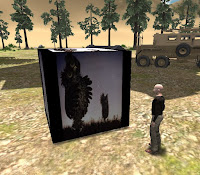
Watching "Hedgehog in the Fog"
in my Jibe world.

Note: You'll need the Unity Pro editor if you want to work with Movie Textures in Unity3d.
Unity3d allows you to embed and play videos on any surface in a 3d environment.
This means you can easily create a web-based Jibe world where avatars explore a multiuser 3d virtual space while watching videos or movies playing on screens/signs/any surface you wish.
The most common way to add video to a Unity3d project is by adding a video file to your project's Asset Folder, which automatically creates a Movie Texture (details here).
However, adding a video file directly to your project means the size of the video file will be added to the final size of your completed Unity webplayer file.  In other words, if your video clip is 50 Megabytes large, then your Unity webplayer file will have an extra 50 Megabytes added on to it.
For folks creating Jibe worlds with Unity3d (or anyone creating Unity webplayer files for streaming on the Web) this is not good.  You always want your webplayer file to be as small as possible so your webplayer file will finish downloading and start running as quickly as possible.
Fortunately, there's a way you can download/stream a movie from the Web so it doesn't add to the size of your Unity webplayer file.  Unity will immediately start playing the movie as soon as it has buffered enough of it, similar to how YouTube works.
Here's a simple example:
Step 1: Get your video ready as an OGG file on the Web

Unity needs videos to be in OGG format (file extension .ogg).  If you need to convert an existing video file into OGG format, I suggest using VLC (it's free and cross platform).  Take your OGG video, put it on a webserver somewhere and remember the URL.

Important Note: If you're managing your own webserver, be sure it has the MIME type for Ogg Vorbis enabled.  For Extension use .ogg, and for MIME type use application/ogg.
Here's a sample 60 Megabyte OGG video I made and uploaded to Wordpress.  Feel free to use this URL in your own tests.  You can also click on it to see how it plays in your browser.
http://becunningandfulloftricks.files.wordpress.com/2013/04/hedgehog_in_the_fog.ogg
Step 2: Create a Cube


In this example, we're going to make a basic cube and have the video play on its surface.  Of course you could flatten the cube so it looks likes a screen and then place it on a model of a TV or something.  I'm just being lazy.

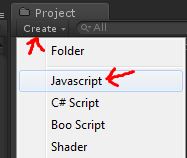
Step 3: Create a new Javascript


I like the name of a script to remind me what the script actually does, so I'm going to call this new script ClicktoPlayWebMovie.


Here's the code.  Copy and paste this into your new script and save it.


var url = "http://becunningandfulloftricks.files.wordpress.com/2013/04/hedgehog_in_the_fog.ogg";
function OnMouseDown () {
 // Start download
 var www = new WWW(url);
// Make sure the movie is ready to start before we start playing
 var movieTexture = www.movie;
 while (!movieTexture.isReadyToPlay)
 yield;
// Initialize texture to be 1:1 resolution
 renderer.material.mainTexture = movieTexture;
// Assign clip to audio source
 // Sync playback with audio
 audio.clip = movieTexture.audioClip;
// Play both movie & sound
 movieTexture.Play();
 audio.Play();
}
// Make sure we have audio source
@script RequireComponent (AudioSource)
function Update () {
}
You can see at the top of the script that I've included my demo URL as the default movie URL.  You can always change it later.
Step 4: Add ClicktoPlayWebMovie script to your cube


Drag the ClicktoPlayWebMovie script from your Project folder onto the Cube in your Scene view.  This will add the script to the cube.


Now select your Cube in the Scene view and look at the Inspector settings.  You can change the movie URL by simply editing the URL field in the Inspector.
Also notice that there is an Audio Source added to the Cube.  This was added automatically when you added the script to the Cube, since the script needs an Audio Source component to work.  Don't delete or modify the Audio Source component.  Just leave it be.


Step 5: You're done.  Test it out!


You can run your Jibe world locally in the Unity editor and test it out that way.  Walk up to the cube and click on it.  The movie will start playing on all surfaces of  the cube.


Enjoy!
-John "Pathfinder" Lester
Chief Learning Officer, ReactionGrid Inc.

Wednesday, January 30, 2013

ReactionGrid Inc: Growth and Change in 2013

Growth and Change always happen together. For something to evolve and flourish, it must grow.

And you cannot have growth without change.

ReactionGrid Inc. is growing and changing. Over the past year you've seen us shift away from Opensim to focus on developing our own proprietary web and mobile-based Jibe platform. You've also seen us evolve into a production studio that provides custom development services for educational 3d simulations using Jibe and Unity3d.

In 2013, you will see us continue to grow. We're working to expand our in-house videogame and instructional design expertise so our team can create the highest quality custom learning simulations. We're enhancing many of Jibe's core features to make it the most compelling multiuser 3d simulation environment out there, with the ability to coordinate complex data flow between virtual and physical world devices. And we are starting some major new projects with clients who are exploring amazing opportunities in the areas of immersive education and deeply engaging learning.

Along with all this change comes changes in leadership. Chris Hart has left her position as CTO to pursue her own ventures in data visualization, and she has handed over her lead developer role to Matthew Bertrand. Matt's been working with ReactionGrid for several months now, and we're very excited for him to take on this new challenge. Chris will remain an active contributor on the Jibe Unity Google Group in case anyone wants to pick her brains about all things Jibe.

At the helm of ReactionGrid, we're very excited to have Robin Donnelly now leading the company as President and COO. Robin's years of management and business development experience will be a great asset during this new phase of ReactionGrid's evolution. And lastly, Kyle Gomboy has left ReactionGrid to pursue his own projects. We wish him the best of luck.

We've got a great core team moving forward (see our updated About Us page), and we'll be continuing to expand our expertise while exploring how to integrate virtual worlds with some fascinating emerging technologies.

Keep an eye on this blog. We plan to surprise you in many wonderful new ways.

-The ReactionGrid Team


Friday, January 18, 2013

How to create Wandering Animals in your Jibe world using Unity 3D Pro


A great way to breathe life into your Jibe world is to add animated animal models that wander around the 3d landscape.  Here's how you can do it using the Pro version of the Unity3D editor.
The Unity Asset Store has many great models available for low cost that can make your Jibe space come to life. Just run a search for Horse or Cow and you may find just the model you're looking for. To make roaming animals, look for animals that come complete with animations. Mixamo produce many models that work well in Unity, though there are plenty of other publishers you can choose from. For this simple ambient animal example, you need just two animations - one for a stationary animal (so an idle / grazing animation) and a walk or run.
Step 1 - place animals and place empty cubes that the animals will walk to.  If you want the cubes to be specific per animal than you can place them in the animal object in the Hierarchy for organization but it doesn't matter where they are in the Hierarchy for performance. Making the cubes specific to an animal (by dragging those items into the hierarchy of the animal) then you can move the animal and the relative waypoints together in edit mode more easily.
Step 2 - Set up the Nav Mesh. to do this go to the Windows menu and open the Navigation window located towards the bottom of the list
Next select from the Hierarchy any objects that you want the animals to avoid such as buildings, fountains etc. In the Navigation window under the Object Tab those objects will appear with two check boxes and a drop down. Check off the Navigation Static check box to make it true, this will prevent the Nav Mesh from going under or through these objects. Next select the Terrain from the Hierarchy and check both Navigation Static and OffMeshLink Generation
Now in the Navigation Window click on the Bake Tab located next to the Object tab (do not press the Bake button at the bottom of the Window yet).  These settings will determine the accuracy of the Nav Mesh:
  • Radius - how close to walls the Nav Mesh will generate.
  • Height - how much clearance is required for the Nav Mesh to go under a floating object.
  • Max Slope - the steepness of a slope that Agents can traverse.
  • Step Height - the step-up height Agents can traverse between levels.
  • Min Region Area - the smallest amount of space that the Nav Mesh can exist in.
  • Width Inaccuracy % - how inaccurate the horizontal distance from wall and ledges the Nav Mesh is.
  • Height Inaccuracy % - how inaccurate the vertical distance between the terrain the Nav Mesh is.
The Generate Off Mesh Links are for special actions of Agents being able to jump across gaps and drop down from ledges.
When everything is set up the way you want it click the Bake button located at the bottom right of the Navigation Window.
Step 3 - setting up the Animal AI. Download RGScripts.rar (includes AutoAnimateNPC.cs and NavigateToTarget.cs).  The below picture are the four scripts that will need to be on the animal to allow them to walk around.
  • Animation - Set up the animations that the Animal will be able to do.
  • Nav Mesh Agent - The most important of the scripts, this is what attaches the animal to the created Nav Mesh. Most of the settings in here are straight forward, the Radius is a collision sphere that tracks where the animal is on the nave mesh, speed is how fast the animal will move, height is how tall the Nav Mesh collision sphere is (so if there is a bridge that can be walked under and the height is set too high the animal won't be able to get under the bridge.
  • Auto Animate NPC - plays the correct animations when walking or idle.
  • Navigate To Target - sets the targets that the Animal can walk to.  This script will talk to the Nav Mesh Agent selecting a random destination from the list and passing that position to the Agent.
When you are happy that all works as it should, make all the targets invisible by turning off their Mesh Renderer component and removing their box collider components so you won't end up bumping into invisible boxes as you walk through the scene.
Step 4 - Run the game and enjoy.

-Matt Bertrand
Jibe Developer, ReactionGrid

Thursday, November 15, 2012

Jibe 1.5 and Unity 4

Over the past months we've been busy working on several development projects for clients, and in each project we have had the chance to expand on our Jibe platform. The upcoming release of Jibe 1.5 will incorporate many of the features we have developed, and we will be ensuring that the release will be 100% compatible with the newly released Unity 4 editor.

Planned features for Jibe 1.5 include:


  • Room variable support
  • Photon 3 & Photon Cloud support
  • Improved avatar pipeline to enable wider range of custom avatars
  • Reduced requirement for naming conventions for avatar outfits when customizing appearance options
  • Animations can have any name, and are mapped to known animation states via a simple script set up in the Inspector (makes it much easier to grab animations from places like the Mixamo store to add simple gestures to your avatars)
  • Appearance maps can support model, hair and outfit choices out of the box, the goal is to move towards a more extensible system
  • Storage and retrieval of avatar dressing choices for Jibe Mars customers for future implementation of immediate login of pre-dressed avatars.
  • Simplified networking scripts for position updates of objects
  • Recategorized Jibe scripts in Unity hierarchy for clearer organization
  • Increased flexibility on login process
  • Change from three scripts (ChooseAvatar, DressingRoom, SingleSceneConfiguration) for choosing avatars and logging in, to one single simplified script (JibeLogin)
  • Combine Loader and Dressing room concepts into a Login scene where you can choose all outfit choices on login. 
  • Or you can change which scene is the first in the build order and log in directly to the main scene where the activity will take place
  • Dedicated dressing room can be reached from any other scene in the build and should return you to the last known location
  • Extra sample scripts for more common functionality (such as taking screenshots from inworld)
  • Spatial audio support for Vivox voice on web player builds
  • Chat history plus ability to chat from the webpage (removing the need to have the chat textbox on screen all the time while inworld)
  • Single player mode for offline testing - extremely useful for debugging while not connected, or for doing a demo from behind a tight firewall
  • Improved event tracking scripts for capturing additional information about user interactions
  • Improved tracking of Account UUID (Unique Identifier for a logged in user) for use within websites where tracking by known ID is important. This feature enables both understanding of the current ID of the player from the multiplayer server perspective and from a user-maintained system.
  • 100% C# codebase with final scripts converted from Javascript.
  • Updated Jibe manual with full information on each of the new features in the platform!
We've also updated our Jibe Web Suite for our hosted and behind firewall server customers to include a rich administration site and support for groups and role based permissions to give you more control over access to your Jibe worlds. We're rolling this out to all our existing clients (it is compatible with 1.4.2 as well as 1.5) - let us know if you would like to apply for a priority upgrade by dropping us a note to our ticket system at http://metaverseheroes.com

Jibe 1.5 will be coming out as soon as we finish our QA testing. In the meantime, customers who are eager to try out Unity 4 should do so with caution until we can isolate any potential issues with the new editor and have approved the use and support of the new editor, and any issues that the pioneers of you may find please contribute your findings to our Jibe-Unity Google Group! If there are any significant issues with Jibe 1.4.2 and Unity 4 we will provide updated project kits to customers as soon as we can.


Tuesday, November 6, 2012

Speaking at "Train for Success" Panel on the Future of Virtual Worlds - Nov 8 @ noon Eastern


The Gronstedt Group hosts a weekly "Train for Success" speaking series, and this week I'll be participating in a panel discussion on the State and Future of Virtual Worlds.

The panel will be held in Second Life and starts on Thursday November 8 at noon Eastern.  You can also watch and ask questions via the live stream on the web.  

For more details, please see Facebook.  Here's a summary:
"The landscape of virtual worlds is changing. Social and game mechanics make virtual worlds more engaging. Browser-based virtual worlds make them more accessible to a wider audience. The panel will discuss the state and future of virtual worlds. Join this conversation about the emerging platforms and applications of virtual worlds in learning and business." 
Hope to see you there, and special thanks to Anders Gronstedt for inviting me to participate.

-John "Pathfinder" Lester
Chief Learning Officer, ReactionGrid

Wednesday, October 3, 2012

Online Presentation at Agile Worlds 2012

I'll be giving a presentation today (Wednesday October 3rd) at 8pm Eastern as part of the Agile Worlds 2012 Online Conference.

My topic will be "Integrated Reality and Next Generation Virtual Worlds." Here's detailed info on my session.

Please feel free to visit my Agile Worlds Jibe space at 8pm if you'd like to attend.  Hope to see you there!


UPDATE 10/4/21: Here's a video recording of the event.


-John "Pathfinder" Lester
Chief Learning Officer
ReactionGrid, Inc

Friday, September 28, 2012

Building Immersion through Simple Design: Visit a Meteor Shower in Jibe

Anyone can create an exciting immersive experience in a multiuser 3d virtual world platform like Jibe.

It doesn't have to be complicated.

And it doesn't require loads of money and development time.

The trick is to follow a few simple design rules.


Friday, September 14, 2012

Learn more about the Jibe platform on ReactionGrid's new website

After much work by the entire team, ReactionGrid's new website is now live!


Visit the new site to learn more about how people and organizations are using the Jibe platform to create interactive multiuser 3D experiences that capture the imagination.

And if you have any feedback about the new design and layout, please leave us a comment.

-The ReactionGrid Team

Thursday, August 16, 2012

Video of panel on "Virtual Worlds Revisited" at the 2012 Chicago eLearning and Technology Showcase

I recently participated in a wonderful “Virtual Worlds Revisited” panel discussion as part of the Chicago eLearning and Technology Showcase.  The panel was organized and moderated by Mike Kemmler, and participants included virtual world innovators Anders Gronstedt , Mark Jankowski and Karl Kapp.

The panel was held in Second Life, but the focus of our discussion was firmly on the future of new virtual world platforms and new modalities for immersive learning. We were projected into the physical world meeting room in Chicago where about 30 people attended in person. Here’s a summary:
Still deeply entrenched in Gartner’s Trough of Disillusionment, is it time to revisit virtual worlds?  Mike Kemmler hosts a virtual panel discussion via Second Life with a distinguished group of virtual world innovators, presenters, consultants, and authors, including Anders Gronstedt, Mark Jankowski, Karl Kapp, and John “Pathfinder” Lester. Panelists address the current state of learning in virtual worlds, explain platforms they see organizations using for immersive learning, and discuss current challenges and future possibilities of using virtual worlds for learning.
Thanks again, Mike, for this great opportunity.  It was an honor to be on a panel with such a stellar group of pioneers in virtual worlds and immersive learning.

NOTE: The audio from Second Life is bit choppy for the first 30 seconds, but then clears up perfectly for the rest of the video.

-John "Pathfinder" Lester
Chief Learning Officer
ReactionGrid Inc.

Friday, June 8, 2012

Speaking at the Academic Librarians 2012 Conference - Syracuse University, June 12-13

I've been invited to attend and speak at the Academic Librarians 2012 Conference at Syracuse University from June 12-13.  This conference will be a great opportunity to connect with folks interested in building the future of immersive learning and information literacy.  Here's a description from the conference website:
Value. Learning. Technology. Librarianship.  As with all libraries and organizations, we must constantly demonstrate our value to our stakeholders amidst the changes brought on us at an increasing rate by the technology that we and our students use.  Technology shapes our interactions with others, our learning techniques and styles, and our pedagogy; it can affect the way our value is perceived. This year’s conference explores value, community, collaboration, social awareness, and applications that enhance learning. How do we demonstrate the value of the academic library in this changing information environment? How do we reach and teach our students? How is information literacy being transformed? Is it possible to game to learn or learn to game? What is the new librarianship?
The topic of my presentation will be "Intersections of the Future: Gaming Technology, Virtual Worlds and the Web."  Here's a summary of what I'll be talking about:
John will share his experiences using gaming technology and virtual world platforms to augment education. He will discuss future trends in specific gaming technologies such as Unity3d as well as ReactionGrid's Jibe platform, a multiuser virtual world system that works on the web and with mobile devices. John will also explain common pitfalls when exploring virtual world technologies and highlight the unique affordances of virtual worlds when they are interwoven with existing social media and web-based educational content. 
Thanks again to Mary-Carol Lindbloom, Executive Director of the South Central Regional Library Council, for kindly inviting me to participate.  I'll be at all of the conference sessions, so please drop me a tweet if you're also attending and would like to connect.

See you in Syracuse!

-John "Pathfinder" Lester
Chief Learning Officer
ReactionGrid, Inc.

Monday, April 23, 2012

ReactionGrid's CLO John Lester presenting at Norwegian University of Science and Technology

The Department of Computer and Information Science at the Norwegian University of Science and Technology (NTNU) in Trondheim, Norway is hosting a seminar this week on "Virtual Worlds & Educational Technologies."

The seminar will be held on Wednesday April 25th from 11:00-14:00 CEST, and it's free and open to both staff and students.  Here's a summary of speakers and topics:
  • Associate prof. Judith Molka-Danielsen, Molde University College, Norway: Educational Use of Virtual Worlds: Review of Current Research and Initiatives for Forming Good Practices
  • Prof. Vladimir Uskov, Bradley University, USA: Computer Science and Computer Information Systems Curriculum Innovations
  • Prof. Catherine Fulford, University of Hawaii, Manoa, USA: Educational technology and 3D virtual worlds at the University of Hawaii, Manoa
  • Associate prof. Mikhail Morozov, Mari State Technical University, Russia: Parallel Time and Space: Capturing Learning in 3D Virtual Worlds
  • John "Pathfinder" Lester, Chief Learning Officer, ReactionGrid Inc. (distantly from Canada): Integrated Reality and Next Generation Virtual Worlds 
All of the other speakers will be attending and presenting locally, but I'll be giving my talk online starting at 13:00 CEST (that's 7:30am EDT).  Attendees in Trondheim will be watching and listening to me on a projection screen in the lecture hall.

If you'd like to watch and listen to my talk live, go to my join.me page and then join the audio conference call.  I won't be taking any questions by voice, so please use join.me's text chat.  Here's my presentation abstract:

Integrated Reality and Next Generation Virtual Worlds: Integrated Reality is the augmentation of our way of communicating and sharing knowledge through the use of all our technological tools in a complementary way. Examples of such tools include virtual worlds, augmented reality, the web and mobile devices. Next Generation virtual worlds will be tightly coupled to many other emerging technologies such as robotics and augmented reality, and will provide platforms for much broader use among teachers and learners. This presentation provides an overview of virtual world platforms, discussing their use as immersive learning environments and future possibilities for both technological and pedagogical innovation. It will include a live tour of ReactionGrid's Jibe platform.

There are many innovative research and development projects in virtual worlds and education coming out of Scandinavia (you can learn more via the Nordic Virtual Worlds Network), so I'm very excited to be a part of this seminar.  Thanks again to Ekaterina Prasolova-Førland for inviting me to participate.


UPDATE 4/25/12: Here are my slides:

-John "Pathfinder" Lester
Chief Learning Officer
ReactionGrid Inc.

Tuesday, April 3, 2012

Using Virtual Worlds to Reduce Stress

relaxation training in a virtual world

A fascinating paper was just published on the topic of using virtual worlds to train people in stress reduction techniques.

"The Feasibility and Impact of Delivering a Mind-Body Intervention in a Virtual World"

The paper describes a pilot project using a virtual space to bring volunteers through a mind-body medical intervention. The volunteers learned how to elicit the relaxation response, a physical state of deep rest that changes the physical and emotional responses to stress.  Typically, people learn how to do this in physical-world training sessions.  But in this case, they were able to use a 3d simulation in a group learning environment.

Some of the challenges they faced in the course of the project included:

"...although it is indeed feasible to present this type of program in a virtual world, the user interface is problematic. Recruitment was limited to individuals with prior experience in Second Life since the interface was known to be a barrier to entry. Even with such inclusion criteria, some of the less experienced users had problems that likely affected their participation."
 and

"...in the absence of remote sensing technology, it is very difficult to know if the participants are taking part in the exercises or successfully eliciting the relaxation response."
Our next-generation multiuser virtual world platform Jibe addresses all of these challenges.  When you set up your own Jibe world, you have complete control over the user interface and can customize/simplify it however you wish.  A Jibe world can also be embedded in any web page, which makes it as easy as possible for people to access.  And finally, we've build our Jibe platform from the ground up so that it can directly interface with remote sensing technology.

Due to the positive results from this pilot study,  Dr. Daniel B. Hoch and his team are planning to conduct further research.  It will be very exciting to see techniques like this evolve to improve the quality of life of people around the world.  And here at ReactionGrid, we'll keep building the technological platforms that can help make it all happen.

UPDATE 4/6/2012: Here's a press release about the research project from Massachusetts General Hospital with additional quotes from Dr. Hoch.

-John "Pathfinder" Lester
Chief Learning Officer
ReactionGrid Inc.


Thursday, March 15, 2012

Kyle Gomboy, CEO of ReactionGrid, Speaking at the Virtual Worlds Best Practices in Education (VWBPE) Conference

UPDATE 3/16/2012: Kyle is out sick today.  But John "Pathfinder" Lester (ReactionGrid's Chief Learning Officer) will be filling in for him.  The show must go on!

The 5th Annual Virtual Worlds Best Practices in Education (VWBPE) Conference starts today and runs through Saturday.  Check out their full conference schedule.

The VWBPE conference is an opportunity for innovative educators, teachers and designers to gather on a global scale for serious discussions and feedback about what is happening in 3D virtual environments and games. 

Kyle Gomboy (CEO, ReactionGrid) will be giving a keynote presentation tomorrow, Friday March 16 at 2pm EDT.  You can attend his presentation in Second Life or tune in and watch it streamed live.

We've got a ReactionGrid booth set up in Second Life during the conference, so please stop by and visit us.


And our good friend David Deeds has a booth right next to us with lots of great information about 3d virtual worlds in K-12/International schools as well as info about his new book, a Jibe/Unity: School Quick Start Guide.


 See you inworld!

-John "Pathfinder" Lester
Chief Learning Officer
ReactionGrid Inc.

Institute for Digital Intermedia Arts - Virtual Broad Art Museum in Jibe


The Institute for Digital Intermedia Arts (IDIA) at Ball State University is a research and design studio exploring virtual reality, simulation, games and interactive interfaces.

IDIA been commissioned to design and build a virtual presence and artworks for the upcoming Eli and Edythe Broad Art Museum at Michigan State University. 

And they're building it with ReactionGrid's Jibe platform!

For more information, check out IDIA's project website.


Chief Learning Officer
ReactionGrid Inc.

Tuesday, February 28, 2012

Virtual Worlds Presentation for 2012 Virtual Enterprise Conference at Glyndŵr University


The Virtual Enterprise Conference at Glyndŵr University brings together a diverse range of web entrepreneurs, students and academics to discuss the opportunities for e-entrepreneurship offered by virtual worlds and the social web.  It's hosted each year by the Centre for Entrepreneurial Learning at Glyndŵr University.

On Feb 23 at this year's conference, I had the pleasure of giving a presentation on Best Practices in Virtual Worlds.  Here's the full video.  


The Right Tool for the Right Job: Best Practices for Virtual Worlds from John Lester on Vimeo.

You can grab a copy of my slides on Google, and you can visit the Jibe world featured in my presentation by going here.

Thanks again to Matthew Draycott from the Centre for Entrepreneurial Learning at Glyndŵr University for inviting me to speak.  It was a great opportunity!

- John "Pathfinder" Lester
Chief Learning Officer
ReactionGrid, Inc.