As of last week, I've left ReactionGrid. For more details and to get in touch with me, please see my personal blog:
http://becunningandfulloftricks.com/2015/08/28/leaving-reactiongrid-moving-onward-and-forward/
Take care,
-John Lester

News from virtual world developer ReactionGrid Inc.
Saturday, August 29, 2015

Wednesday, April 15, 2015
How to get Unity Webplayer to work with Chrome
First I would like to give credit where credit is due.
I learned this fix from Eric Hackathorn. https://twitter.com/hackshaven/status/588373524705771520
Thanks Eric!
Recently Chrome stopped the NPAPI support for their browsers leaving those of us who log in to Unity3D Webplayer sites unable to install the Unity webplayer.
But there is a fix, only until September though.
type: chrome://flags/#enable-npapi in the address bar of your Chrome browser. Click enter.
When brought to the next page find NPAPI and click enable.
Now restart your browser.
Try to log in to a unity webplayer site and you should be able to access the Unity webplayer now.
This fix worked for some people but not all and all support will be terminated by Chrome by Sept 2015 so you fix will work til then.
https://sites.google.com/a/chromium.org/dev/developers/npapi-deprecation
In September 2015 (Chrome 45) we will remove the override and NPAPI support will be permanently removed from Chrome. Installed extensions that require NPAPI plugins will no longer be able to load those plugins.
I learned this fix from Eric Hackathorn. https://twitter.com/hackshaven/status/588373524705771520
Thanks Eric!
Recently Chrome stopped the NPAPI support for their browsers leaving those of us who log in to Unity3D Webplayer sites unable to install the Unity webplayer.
But there is a fix, only until September though.
type: chrome://flags/#enable-npapi in the address bar of your Chrome browser. Click enter.
When brought to the next page find NPAPI and click enable.
Now restart your browser.
Try to log in to a unity webplayer site and you should be able to access the Unity webplayer now.
This fix worked for some people but not all and all support will be terminated by Chrome by Sept 2015 so you fix will work til then.
https://sites.google.com/a/chromium.org/dev/developers/npapi-deprecation
In September 2015 (Chrome 45) we will remove the override and NPAPI support will be permanently removed from Chrome. Installed extensions that require NPAPI plugins will no longer be able to load those plugins.
Chrome update causes Unity Webplayer to not work
This morning my team and I noticed that Chrome had updated for one of my team who had rebooted this morning. Upon trying to enter our Team Space (a Unity space) he ran into Chrome asking him repeatedly to install - it never installs.
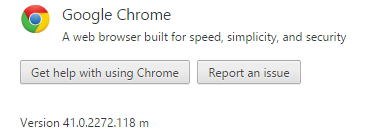
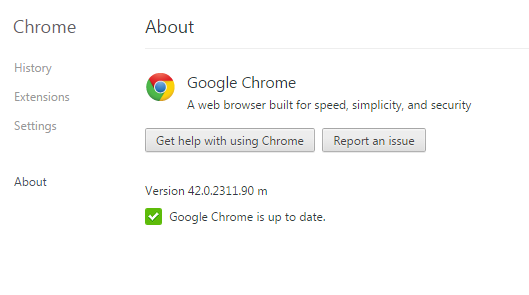
We tested and version 41.0.2272.118 m does work but Chrome version 42.0.2311.90 m does not.
We have alerted Unity3D on the Answers forum:
http://answers.unity3d.com/questions/947831/unity-web-player-plugin-is-completely-broken-in-la.html
I am currently looking to find an avenue to alert Google about their newest Chrome version not working with the Unity3D webplayer plugin.
We will update you with further information as soon as we have some.
In the meantime, please do not update your Chrome browser to version 42.0.2311.90 m
OK so looked for answers on rolling Chrome back to a previous version and this is what I found
We tested and version 41.0.2272.118 m does work but Chrome version 42.0.2311.90 m does not.
We have alerted Unity3D on the Answers forum:
http://answers.unity3d.com/questions/947831/unity-web-player-plugin-is-completely-broken-in-la.html
I am currently looking to find an avenue to alert Google about their newest Chrome version not working with the Unity3D webplayer plugin.
Works
Does not work
We will update you with further information as soon as we have some.
In the meantime, please do not update your Chrome browser to version 42.0.2311.90 m
OK so looked for answers on rolling Chrome back to a previous version and this is what I found
Can I roll back Google Chrome to a previous version?
No - rollback is not supported.To get to a previous version (which would not be supported by Google), you would need to uninstall your current version, delete every user's saved profile data, and re-install the older version. Users' personal profile data is kept in:On Windows XP: C:\Documents and Settings\<user>\Local Settings\Application Data\Google\Chrome\User DataOn Windows Vista / 7: C:\Users\<user>\AppData\Local\Google\Chrome\User DataThis means users will lose their bookmarks, history, etc., so use this method with extreme caution.
Friday, February 13, 2015
On Sale Now: ACES Display Boards - A Live In-World Customization Toolkit for your Jibe Multiuser Virtual World
Need a powerful system that allows you to easily change in-world surface images/textures, make live modifications, and add customized web-links within your Unity-based Jibe multiuser virtual world?
Check out ACES from ReactionGrid.
 |
| This beautiful 3d store model is made up of many high quality 2d surface images/textures, and I could modify any of them with ACES. |
 |
| Use the in-world menu system to change surface textures and weblinks. |
 |
| I just changed the junk food aisle into one containing healthy fruit using ACES! |
 |
| Everything looks better with Wiener Dogs. |
Questions? Please ask us anything at our Online Service Desk.
Take care,
Chief Learning Officer, ReactionGrid
Thursday, February 12, 2015
Chat Groups for Jibe and it's Free
ReactionGrid now has Public Chat Groups for Jibe!
Setup of Public chat groups in your Jibe Project is easy now!
Public chat groups are set up in two ways.
The first type of chat groups are accessible from anywhere in the Jibe scene, these are accessed by entering a Jibe scene, clicking on the "Online Users" button in the bottom left corner of the screen. Here you will see a new window called "Public Chat Groups" to enter into a group to chat simply click on the talk bubble icon to the right of the group you want to join.

The second type of chat groups are location based, this chat will open when you enter the area designated for this group.

Both chat group styles are not exclusive, you can set location based groups to point to groups listed in the public window too.
Free to those to own Jibe, grab these scripts by submitting a service desk request:
http://metaverseheroes.com
http://metaverseheroes.com
Follow these instructions to Set Your Chat Groups Up:
https://reactiongrid.atlassian.net/wiki/display/KBP/Chat+Groups%3A+How+to+Setup+and+Use+Group+Chat+in+your+Jibe+World
https://reactiongrid.atlassian.net/wiki/display/KBP/Chat+Groups%3A+How+to+Setup+and+Use+Group+Chat+in+your+Jibe+World
Friday, January 30, 2015
ACES: A new system from ReactionGrid that adds live inworld customization to your Jibe 3d multiuser virtual world.
Check out this powerful system from ReactionGrid that allows you to easily change in-world surface images/textures, make live modifications, and add customized web-links within your Unity-based Jibe multiuser virtual world.

More details in this video!
What is ACES?
- ACES is a system that adds user-modifiable display boards to a Jibe world. Any image on the web can be projected onto any display board, and boards can be configured to open any URL in a new browser window.
- The content in an ACES display board can be changed in-situ (within the live published Jibe world) with no work required in the Unity editor.
- All ACES display boards can be changed inworld by any user who has logged in with an account that has administrative level access.
- ACES display boards can also be configured so that any user can “claim” an unused board as their own and then have full admin control over it.
- ACES display boards don’t have to look like boards! Imagine changing the image textures of storefronts, buildings, any surface at all in your Jibe world.
Live demo:
http://demos.jibemix.com
Demo Accounts:
ACES Admin / password
Demo User / demodemo
ACES is available for sale now in ReactionGrid's Online Store!
Take care,
-John "Pathfinder" Lester
Chief Learning Officer, ReactionGrid
Wednesday, January 7, 2015
New Support System - Effective January 19th, 2015
Effective starting Friday January 16th, 2015
ReactionGrid Inc will be utilizing a new ticketing/support system. By this date,
we will no longer be monitoring our old ticketing system and it will be
utilized for archiving purposes only. If you need to retrieve any old tickets
or information, you can navigate to http://metaverseheroes.helpserve.com.
In order to access our new support system, go to this link: https://reactiongrid.atlassian.net/servicedesk/customer/portal/1.
Create an account if you have not already done so, or log into your existing
account to submit a request for assistance. By this Friday, January 9th,
we will point our old ticketing system webpage to our new support system
webpage: https://reactiongrid.atlassian.net/servicedesk/customer/portal/1,
which will make switching over easier and convenient.
In order to create a request with our new support system,
click on one of the 3 categories: “Jibe & Unity3D Assistance”, “Server
Assistance” or “General Questions”. These are the 3 current categories,
although there may be more added later. Enter in a summary, a description of
your request/question, click submit, and we will get back to you as soon as
possible!
Thank you for your attention to this matter and best wishes
to all,
Ashley Pacailler
Accounts Receivable & Customer Support
ReactionGrid Inc
Tuesday, December 2, 2014
Today Dec 2 at 2pm EST
Join me for a session on:
How to Add New Avatars to your Jibe project
I will be using TeamViewer for the sessionyou can join in a browser or through the TeamViewer Application
Please join the meeting, by clicking on this link:
http://go.teamviewer.com/v10/m57723507
Meeting ID: m57-723-507
I will begin the Teamviewer session at 1:30pm EST to allow for everyone to get into the Screenshare in plenty of time.
There is voice available through Teamviewer but if there is any troubles we can switch over to Skype.
Can't wait to see you all there!
Robin
Wednesday, November 19, 2014
ReactionGrid Holiday Hours
Due to the Thanksgiving and Christmas approaching,
ReactionGrid would like to inform you of our upcoming holiday hours.
For the Thanksgiving Holiday, ReactionGrid will be out of
office Thursday, November 27th and Friday the 28th. We
will have a staff member standing by to answer your support tickets. To submit
a support ticket, please go to: http://metaverseheroes.helpserve.com/
In regards to our Christmas Holiday hours, ReactionGrid will
be out of office December 22nd through January 2nd. Emergency
Support Tickets will be answered during these dates. We will resume normal hours
on January 5th, 2015.
We wish you the happiest of holidays and urge you to stay
tuned for upcoming announcements before the end of the year!
Tuesday, November 11, 2014
Learn how to make Player Characters for Jibe Dec 2
Over this past year as the CEO of ReactionGrid, I have been listening to our clients asks & our team has been reacting.
One of those asks was for additional avatars to use as Player Characters either as pre-made packs for easy installation or an easier way of creating models/avatars and getting them in as choices in Jibe. Through much research and rework we made some great progress on both Legacy & Humanoid rigging & animating. Now we are ready to share what we have learned with you.
ReactionGrid announces Character Packs - more details below under Player Character Packs. And you can make your own Characters. We have a jumpstart class for you.
It's not difficult at all to make your own Characters using Fuse & Mixamo.

We can show you how!
Tuesday
Dec 2 at 2pm est
RSVP in comments below to reserve your seat

Expand your options & create new characters:
- End to end construction of a model in Fuse
- Export to Mixamo
- Rigging & Animation in Mixamo
- Export from Mixamo
- Import into Unity
- Add as a Player Character in Jibe
Player Character Packs:
Medical, Teens, Children, Additional Plain Clothed Adults

Model Rigged & Animated
Basic Animations Provided
Player Character Prefab w Scripts
Thumbnails & Preview Art
All in one Unity Package file so all you have to do is unzip, import and add to your Jibe Network Controller to have a new Player choice.
Character Packs will be available for sale on our website very soon.
Watch our blog for more info...
Watch our blog for more info...
Hope to see you at the presentation Dec 2,
Robin Donnelly
CEO of ReactionGrid Inc
Robin Donnelly
CEO of ReactionGrid Inc
Monday, November 10, 2014
Exporting / Importing content between Second Life, Opensim and Unity
Here's a video of a presentation I recently gave on how to export/import 3d content between Second Life, Opensim and Unity.
And since ReactionGrid's multiuser web-based Jibe platform is built with Unity, you can use this technique to move content into your Jibe virtual world. Watch for my Jibe example in the video!
For more information about the conference, please see this other post.
Take care,
-John "Pathfinder" Lester
And since ReactionGrid's multiuser web-based Jibe platform is built with Unity, you can use this technique to move content into your Jibe virtual world. Watch for my Jibe example in the video!
For more information about the conference, please see this other post.
Take care,
-John "Pathfinder" Lester
Monday, November 3, 2014
Tips on Exporting/Importing Virtual World Content and Speaking at OpenSimulator Community Conference 2014
 The OpenSimulator Community Conference (OSCC) is an annual conference that focuses on the developer and user community creating the OpenSimulator software. Organized as a joint production by AvaCon and the Overte Foundation, the virtual conference features two days of presentations, workshops, keynote sessions, and social events across diverse sectors of the OpenSimulator user base.
Last year's conference was a fantastic experience, and I'm thrilled to be both attending and presenting again this year. All the inworld venue tickets are sold out, but if you can still register for a free streaming ticket and watch all the presentations live on Ustream.

Here's what I'll be presenting this year:
"You Only Own what you can Carry: How to backup and move your content between Second Life, Openim and Unity"Saturday Nov 8 from 9:00am - 9:45am PST
In this hands-on workshop, I'll be demonstrating exactly how to export your own user-created objects (both prim and mesh based) and move them between Second Life, Opensim and Unity. Attendees will watch my desktop via a live TeamViewer screenshare and follow along on their own using freely-available software.
Requirements: Inworld attendees should be using the OSCC recommended 32-bit Singularity viewer and have pre-installed both the free version of the Unity Editor and the free TeamViewer application. No previous technical expertise required, just a willingness to learn.
The crux of my workshop will be a live demonstration of me creating something in both Opensim and Second Life and then walking through exactly how to get it into a scene in Unity. I'll also be demoing how to move content between Second Life and Opensim. If you're worried all this might be overly complicated, I promise it will be a lot easier than you expect. Plus you'll have the fun and "excitement" of watching me do all this live on my own desktop (what could possibly go wrong?). The key takeaway will be that the whole process is easy enough for anyone to learn how to do, regardless of your level of technical expertise.
If you can't watch it live, no worries. My session will be recorded so you'll be able to watch it later. I'll update this blog post with a link to the recording once it's online.
I'll also be a panelist later in the day on "The New Era of Content Protection in OpenSim" where I'll be sharing my thoughts about DRM versus content licensing.

Hope to see you there!
Take care,
-John "Pathfinder" Lester
-John "Pathfinder" Lester
Friday, August 15, 2014
Keynote at e-LEOT 2014 - "Augmented Mind: The Evolution of Learning Tools from Language to Immersive Reality"
The 1st International Conference on e-Learning, e-Education and Online Training is being held September 18-20 in Bethesda, Maryland. This conference will assess a wide range of progressive ideas for the future of e-Learning, focusing on the idea of technology as a means to education rather than an end in itself. The conference organizers have lined up a wonderful range of interdisciplinary speakers and are planning to attract a wide group of heterogeneous scholars and practitioners.
I'll be attending the entire conference, and I'm honored to be giving the opening keynote presentation. Here's what I'll be talking about:

“Augmented Mind: The Evolution of Learning Tools
from Language to Immersive Reality”
from Language to Immersive Reality”
Innovative educators are constantly facing the challenge of matching pedagogical goals with complementary technological tools. Unfortunately, given the wide range of technologies and devices that vie for consumer attention, the right choices are not always clear and are typically obscured by media hype. In this presentation, John Lester will describe how focusing on the way the human mind interacts with the world and other human beings can help identify the right tools for the right jobs. From a mind-augmentation perspective combining constructivist and behaviorist approaches, John will explore web based tools ideal for knowledge management, augmented reality based self-animated autonomous agents, and finally the unique (and sometimes over-hyped) affordances of perceptually immersive multiuser 3d virtual worlds for collaborative learning.
My goal will be to tell an interesting story with examples and demos of technologies that I think really leverage how our minds naturally embrace the world around us. One such technology that I'm currently exploring and that you've probably never heard of are Wiglets.
- Visit Wiggle Planet to learn a lot more about Wiglets.

Wiglets are autonomous, evolving, self-animated and self-motivated agents that can exist in both completely virtual and augmented reality environments. They exist at a wildly creative intersection of artificial life, art and gaming. And perhaps best of all, you can interact with them directly through touch and gestures.
Another topic of discussion will be the affordances of multiuser 3d virtual worlds, especially how one can reduce the barrier to entry for people interested in leveraging them for educational purposes. ReactionGrid has recently developed some new tools that integrate with the Unity3d-based Jibe platform to provide on-the-fly content editing in a simple yet powerful way. I'll be giving a sneak preview during my presentation.
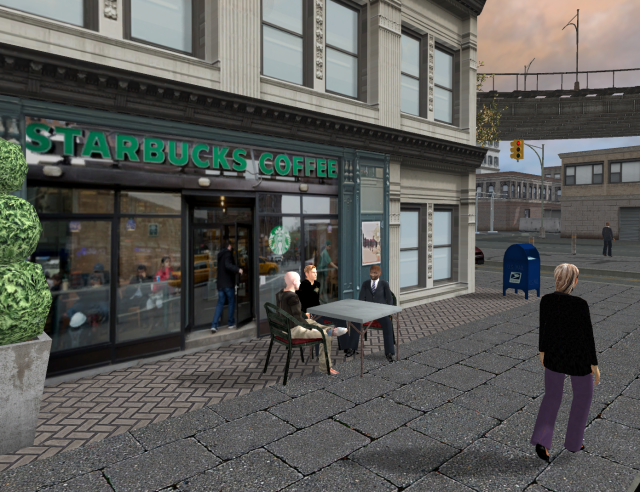
- Want to easily change this web-based 3d environment on the fly without having to muck around in Unity?
Now you can. I've got some new tricks with Jibe to show you.

I'll also be discussing and giving examples of innovative uses of commonly used virtual world technologies such as Second Life, Opensimulator and the Oculus Rift. If you plan on attending and would like to connect with me at the conference, please drop me a line on Twitter or email. And if you're looking to interact with the organizers and other attendees and speakers, be sure to check out the e-LEOT LinkedIn Conference Group.
After my keynote I'll be updating this blog post to include my slides and links to any recordings.
Wednesday, February 19, 2014
Connect with ReactionGrid at these Upcoming Conferences on Virtual Worlds and Experiential Learning
If you'd like to connect with someone from ReactionGrid, here's some information about two upcoming conferences:


March 22-24, 2014
Prague, Czech Republic
The main aims of this conference are to increase our understanding of experiential learning in virtual worlds, both formal and informal, to share experiences and best practices, and to debate future possibilities for learning in virtual worlds. For full details, please see the conference website.
My panel presentation will be "Finding the Balance between Pedagogy and Technology." Here's my abstract:
Next Generation virtual worlds will be tightly coupled to many other emerging technologies, leveraging modern knowledge management processes and providing platforms for broad use among teachers and learners. As the technological landscape grows, it is becoming increasingly difficult for educators to identify the right platform (or mix of platforms) for their specific immersive learning needs.
In my current position at ReactionGrid and my previous work at Linden Lab and Harvard Medical School, I have explored the use of a wide range of gaming and virtual world platforms to augment education. Today there are a number of very interesting virtual world technological trends involving specific gaming technologies like Unity as well as the growth of Open Source platforms such as OpenSimulator. My ongoing work involves finding the right match between educational goals and technological affordances as well as identifying key synergies when virtual world technologies are interwoven with existing social media and web-based educational content.
Above all else, there must be a thoughtful match between pedagogy and technology. Different virtual world platforms are suited for different uses, ranging from collaborative work environments to immersive goal-oriented simulations. One of the most important and challenging goals for any educator exploring virtual worlds is simply finding the right tool for the right job. Likewise, it is critical for virtual world platform developers to keep a firm focus on well established knowledge management principles when designing new technologies intended to advance the field of immersive learning.
I'm particularly thrilled about this panel because I'll be participating with Dr. Bryan Carter from the University of Arizona. Bryan is a true pioneer in using virtual worlds for experiential learning, and he's been working with virtual environments since his dissertation project in 1997 when he created a virtual simulation of Harlem, NY as it existed during the 1920s Jazz Age and Harlem Renaissance. Virtual Harlem was one of the earliest full virtual reality environments created for use in the humanities and certainly one of the first for use in an African American literature course. The project continues to grow and evolve as Bryan explores new virtual world platforms.
September 18–20, 2014
Bethesda, Maryland, United States
This new conference will assess a wide range of progressive ideas for the future of e-Learning, focusing on the idea of technology as a means to education rather than an end in itself. The conference organizers are lining up a wonderful range of interdisciplinary speakers and are planning to attract a wide group of heterogeneous scholars and practitioners. For full details, please see the conference website.
I'll be giving a keynote at this conference. And if you're looking to interact with the organizers and other attendees and speakers, be sure to check out the e-LEOT LinkedIn Conference Group.
If you're planning to attend either of these conferences or if you just happen to be in town when they occur, please contact me via my about.me page if you'd like to meet up and chat about virtual worlds.
Be seeing you!
Friday, December 13, 2013
Unity Runtime Editing
In Unity any changes made to a scene while the game is running are not saved, but there is a simple way work around this instead of writing down every variable changed.
Step-by-step guide
run the game and make the required changes to an object.
- right click on the object (or script) in the hierarchy and select copy component.
- end the running session.
- go to the object in the hierarchy or the prefab version in the assets.
- right click on the object or script and select paste component as values.
Monday, December 2, 2013
Sale today for students who want a copy of Unity 4 Pro + Team License

The good folks at Studica are offering a Cyber Monday (until Dec 6) sale on Unity 4 Pro licenses. If you're a student and you want the power of the latest version of Unity Pro, definitely check it out.
It also includes a copy of the Team License (essential for collaboration!).
(One Year License with Team License- windows/Mac Download)
$130
$130
-John "Pathfinder" Lester
Chief Learning Officer, ReactionGrid
Monday, September 30, 2013
Jibe Limited Starter Program Now Available
Are you currently in Second Life or OpenSim?
Want to convert your prim-based creations into mesh models that you can bring into a web-based Jibe world?
You can use the Singularity viewer to export your prims as mesh objects and import them into Unity in a flash. And our new Jibe Limited package is the best way to start your exploration of Unity3d and Jibe!

Jibe Limited provides a license for a single developer to publish one Jibe world to a hosted web space for 2 months with support for up to 15 concurrent users.
Jibe Limited costs just $25 per month + a one time $25 setup fee.
With the 2 Month Starter Program you get access to documentation and an online support suite to help you along.
After your 2 month term, renewal options at $25 per month will be available as well as upgrade options (e.g., higher concurrency, registration database, inworld metrics).
Jibe Feature Highlights
For more information and demos of Jibe, please see our website or send us a support ticket with your questions.
Want to convert your prim-based creations into mesh models that you can bring into a web-based Jibe world?
You can use the Singularity viewer to export your prims as mesh objects and import them into Unity in a flash. And our new Jibe Limited package is the best way to start your exploration of Unity3d and Jibe!

Jibe Limited provides a license for a single developer to publish one Jibe world to a hosted web space for 2 months with support for up to 15 concurrent users.
Jibe Limited costs just $25 per month + a one time $25 setup fee.
With the 2 Month Starter Program you get access to documentation and an online support suite to help you along.
After your 2 month term, renewal options at $25 per month will be available as well as upgrade options (e.g., higher concurrency, registration database, inworld metrics).
Jibe Feature Highlights
- Web-plugin for browser based virtual worlds.
- Desktop Windows and Mac standalone version.
- Option to convert Jibe world into Android mobile app (additional charge)
- Group and private chat capable.
- Hyperlinks in chat.
- Sit scripts and related animations provided.
- Teleport scripts for current level, rooms & Jibe worlds.
- Free editor at Unity3D for creating the 3D world.
- Import mesh files from Opensim, Second Life, Sketchup, Maya, 3DS & more.
- Use Singularity to Export from Second Life or OpenSim as mesh models.
- Script in industry standard C# or JavaScript.
- NVIDIA Physx physics system.
For more information and demos of Jibe, please see our website or send us a support ticket with your questions.
Wednesday, July 31, 2013
Oculus Rift and Razer Hydra Integration is Coming Soon to ReactionGrid's Jibe Platform
This short video explains and illustrates the functionality of Oculus Rift and Razer Hydra in a Unity3d-based environment.
The live demo part of this video was filmed in Unity's Tuscan Villa demo environment modified by Sixense, the company that created the Razer Hydra device. We’ll be building on their fantastic work to integrate the Razer Hydra and Oculus Rift with our Jibe platform in the coming months.
At ReactionGrid, we're integrating these new hardware devices with our Jibe virtual world platform, thereby giving people the ability to create their own web-based multiuser 3d environments that are fully immersive.
The live demo part of this video was filmed in Unity's Tuscan Villa demo environment modified by Sixense, the company that created the Razer Hydra device. We’ll be building on their fantastic work to integrate the Razer Hydra and Oculus Rift with our Jibe platform in the coming months.
At ReactionGrid, we're integrating these new hardware devices with our Jibe virtual world platform, thereby giving people the ability to create their own web-based multiuser 3d environments that are fully immersive.
Wednesday, July 24, 2013
Setting up multiple spawn points for a scene in Jibe and Unity3d
In this tutorial we'll be going over how to set up spawn
points when teleporting between Jibe scenes.
By default there is only one spawn point in a scene, this can be
inconvenient if you have many exits and only one entrance (ie. buildings).
Thankfully setting up spawn point is pretty easy.
First make sure that you have at least two Jibe ready
scenes. for the purpose of this tutorial I'll show two blank scenes using the
first as a "sender" and the second as a "receiver". Each
scene can be used as both "sender" and "receiver" but for
simplicity sake I will be separating the two.
Now lets go ahead and set up the receiver scene:
Now lets go ahead and set up the receiver scene:
Step 1 - create once cube for every location you want the
player to be spawned in and remove any scripts attached to them.
Step 2 - this step is optional but I highly suggest doing it
for organization. Name the cubes you created accordingly (ie. clinicSpawn,
houseSpawn etc.)
Step 3 - in the NetworkController script there is a list
named SpawnPoints. Set up that list to include every point you want to work as
a spawn and then write down which index number goes with each spawn point (this
will make things easier later).


The receiver scene is now finished and ready to spawn
players so next we need to set up the sender scene:
Step 1 - similar to the receiver scene, create a cubes and
place the wherever you want the player to teleport from and name them
accordingly.
Step 2 - Attach the script LoadNextLevel to each of the sending
cubes and set up the script to look like this:

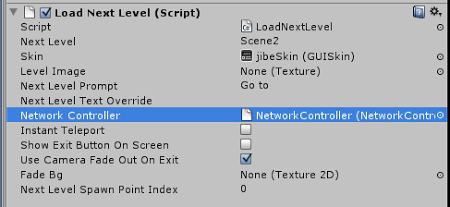
Step 3 - the last variable in the script is called
"Next Level Spawn Point Index" this is where you choose which spawn
point to spawn at. Remember that list of spawn points you wrote down earlier,
this is where you need it, each index number points to a specific spawn point
and this variable is how you tell the teleporter where you drop the player off.
Everything should be all set up and ready to go so test
away.
P.S. You can also find this article on our Jibe 2.0 Manual Addenda page in our public Knowledge Base!
P.S. You can also find this article on our Jibe 2.0 Manual Addenda page in our public Knowledge Base!
Wednesday, May 29, 2013
How to create multiuser networked events in Jibe and Unity3d using iTween
In Jibe 2.0 we've included an easy system that gives you the power to use iTween to create multiuser networked events. This allows you create shared experiences between avatars using interactive and complex object animations.
Watch my tutorial to learn more!
Video: How to create multiuser networked events in Jibe and Unity3d using iTween
Take care,
-John "Pathfinder" Lester
Chief Learning Officer
ReactionGrid, Inc.
Watch my tutorial to learn more!
Video: How to create multiuser networked events in Jibe and Unity3d using iTween
Take care,
-John "Pathfinder" Lester
Chief Learning Officer
ReactionGrid, Inc.
Subscribe to:
Posts (Atom)